Claude Managed Agents - Self-Hosted Sandboxes on Kubernetes with gVisor and Cilium
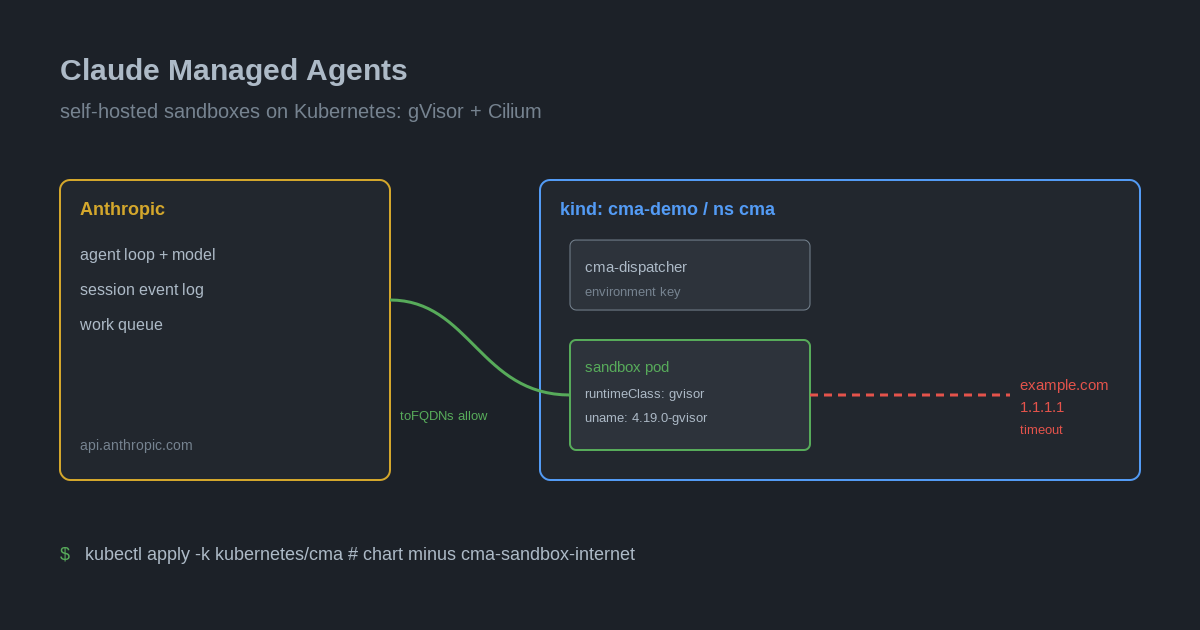
// Anthropic runs the agent loop, your Kubernetes cluster runs the tools. A hands-on build of Claude Managed Agents self-hosted sandboxes on Kind with the official cma-sandboxes chart, gVisor isolation, and a Cilium FQDN policy that locks egress to api.anthropic.com, plus the nine gotchas found on the way.
A hosted agent platform asks you to accept a trade. You get the agent loop, the model, the session history and the retries for free. In exchange, the commands the model writes run on someone else’s machine, next to someone else’s network, and the only thing you know about that machine is what the vendor tells you. For a lot of teams that is fine. For a platform team that already runs Kubernetes, has gVisor on the shelf and enforces egress with Cilium, it is the wrong half of the trade to give away.
Claude Managed Agents has a mode that splits it the other way. With self-hosted sandboxes, Anthropic keeps the agent loop, and every bash, file read and file write the agent makes runs on a worker you operate. Anthropic publishes a Helm chart, cma-sandboxes, that turns that worker into a pod per session on top of agent-sandbox.
I built it on a laptop Kind cluster: every session gets its own gVisor pod, and that pod can talk to api.anthropic.com and nothing else. The last part is where it got interesting, because off GKE the official chart cannot do it. This post covers what I ran, what broke, how I fixed the egress gap without forking the chart, and the evidence that the fix is the thing doing the blocking. The demo lives in srekubecraft-demo/claude-managed-agents/.
Who Should Read This?#
This post is for:
- Platform Engineers asked to “let the agent run code, but on our infrastructure” who want to see what the Kubernetes path looks like end to end
- SREs and security engineers who need to know which credential lives where, and what a prompt-injected agent can reach from inside its sandbox
- Teams already on Cilium who want an FQDN egress lock that works under gVisor
- Anyone who read my agent-sandbox post and wants to see the same CRDs driven by a vendor’s dispatcher instead of my own Go agent
TL;DR#
- Self-hosted sandboxes split Claude Managed Agents in two: Anthropic runs the agent loop, model and session log; your worker runs the tools. The
cma-sandboxeschart (public,0.1.0) gives each session its own pod from an agent-sandbox warm pool. - Three credentials, three places: the Claude API key creates sessions and never enters the sandbox namespace; the environment key lives only in the dispatcher; each sandbox gets a short-lived per-work-item secret.
- Off GKE the chart’s only egress mode is
publicInternet, and a NetworkPolicy of your own cannot narrow it. I rendered the chart withhelm template, deletedcma-sandbox-internetwith a kustomize patch, and added aCiliumNetworkPolicywithtoFQDNs: api.anthropic.com. - The lock is causal: with
api.anthropic.comallowed, the sandbox reaches the API andexample.comtimes out. Swap the allow toapi.github.comand the API is blocked while GitHub works. - gVisor plus Cilium kube-proxy replacement breaks ClusterIP DNS until you set
socketLB.hostNamespaceOnly=true. - Data handling: self-hosted sandboxes are Beta and not ZDR eligible. Tool inputs and outputs still go to Anthropic. Run demo data only.
What Are Claude Managed Agents Self-Hosted Sandboxes?#
Claude Managed Agents is Anthropic’s hosted agent runtime: you define an agent (model, system prompt, tools) and an environment (where the tools execute), then open sessions against them. By default the environment is a cloud sandbox Anthropic runs.
An environment of type self_hosted swaps that cloud sandbox for a work queue. A worker you run polls the queue, picks up a work item for a session, and executes the agent’s tool calls locally. The docs offer two shapes: an always-on worker started with the ant CLI, and one sandbox per session, which on Kubernetes means the cma-sandboxes chart. The agent-sandbox project documents the same integration from its side in its Anthropic use case.
The two YAML files I applied with ant apply are the whole Anthropic-side setup:
# anthropic/environment.yaml
name: cma-demo-kind
config:
  type: self_hosted
---
# anthropic/agent.yaml
name: cma-demo-kind
model: claude-haiku-5-5
system: You run inside a sandbox. Use the bash tool to answer questions about your environment.
tools:
  - type: agent_toolset_20260401
I used claude-haiku-5-5 because the demo prompt is uname, dmesg and a curl. The Console showed the session cost as $0.00.
Note: Self-hosted sandboxes ship behind the
managed-agents-2026-04-01beta header and the feature page lists them as not ZDR eligible and not HIPAA eligible (source). Your worker runs the commands, but the tool inputs and outputs are part of the session and go to Anthropic. Moving execution in-house is an isolation and network-control win, not a data-residency one. Everything in this demo is throwaway data.
Which Execution Model?#
| Option | Where tools run | Isolation you control | Egress you control | Status |
|---|---|---|---|---|
| Cloud environment | Anthropic’s sandbox | None | None | Default |
Always-on worker (ant CLI) | One long-lived host or container | Whatever the host gives you | Host firewall | Beta |
Per-session pods (cma-sandboxes chart) | One pod per session from a warm pool | RuntimeClass (gVisor here), PSS restricted | NetworkPolicy / CNI | Beta, chart 0.1.0 |
Fully self-hosted (cma-server) | Your cluster, plus the agent loop | Same as above | Same as above | Private beta archive |
Bottom line: if you run Kubernetes and want each session isolated from the next, the chart is the option. The always-on worker shares one filesystem and one process space across every session it serves.
What This Is NOT#
- Not self-hosting the model or the agent loop. That is the private-beta
cma-server, step 3 of the demo, which I have not built. - Not a data-boundary control. The session transcript, tool calls and results live on Anthropic’s side.
- Not a Helm release in this demo. The chart is rendered once and applied with kustomize, for reasons below.
Architecture: Three Trust Zones#
flowchart TB
    subgraph Anthropic["Anthropic (api.anthropic.com)"]
        Loop[Agent loop + model]
        Log[Session event log]
        Queue[Environment work queue]
    end
    subgraph Kind["Kind cluster cma-demo"]
        subgraph Client["ns cma-client"]
            Key[(Secret: Claude API key)]
            Job[Job: create session + stream events]
        end
        subgraph CMA["ns cma (PSS restricted)"]
            Disp[cma-dispatcher<br/>holds environment key]
            Pool[SandboxWarmPool]
            Claim[SandboxClaim per session]
            Pod[Sandbox pod<br/>runtimeClassName: gvisor<br/>ant worker]
        end
    end
    Job -->|sessions.create, events| Loop
    Loop --> Queue
    Disp -->|poll| Queue
    Disp --> Claim
    Pool --> Claim
    Claim --> Pod
    Pod -->|tool results, work secret| Loop
The design rule is that the API key and the model-authored commands never share a namespace. Each zone holds exactly one class of credential:
| Credential | What it can do | Where it lives in the demo | Source |
|---|---|---|---|
| Claude API key | Create sessions, send messages, read everything in the workspace | Laptop (gopass) or Secret in cma-client | Quickstart: keep it off the worker host |
| Environment key | Poll this one environment’s work queue | Secret in cma, mounted only by cma-dispatcher | Generate an environment key |
| Per-work-item secret | Serve one session | Handed to the sandbox pod by the dispatcher | Run one sandbox per session |
The sandbox pod, where a prompt-injected model would be running code, holds only the narrowest of the three. Both namespaces that make outbound calls are locked to api.anthropic.com by the same policy shape.
Step 1: A Cluster the Chart Can Use#
The chart guide lists what it needs: Kubernetes 1.30+, the upstream agent-sandbox controller with extensions, a sandboxed RuntimeClass, and a CNI that enforces NetworkPolicy. On Kind that became:
| Component | Version | Why this one |
|---|---|---|
| Kubernetes (Kind node) | v1.37.0 | Latest Kind node image |
| Cilium | 1.20.1 | NetworkPolicy plus toFQDNs |
| Flux | v2.10.0 | Installs agent-sandbox |
| agent-sandbox controller + extensions | v1.0.1 | The version the chart guide says the recipe has run on; v1.0.12 exists, I did not jump ahead of the vendor |
| gVisor | release-20261102.0 | sha512-pinned tarball |
task up builds all of it and finishes with a probe pod under runtimeClassName: gvisor in a namespace whose policy allows DNS only:
$ task verify
PASS gvisor: guest kernel is gVisor
PASS dns: allowed by policy
PASS egress: blocked by NetworkPolicy
That output took four fixes to get to.
gVisor Cannot Reach ClusterIP Services Under Cilium Socket-LB#
The first probe pod could not resolve anything. DNS to 10.96.0.10 timed out from the gVisor pod.
With kube-proxy replacement, Cilium’s socket-LB rewrites a ClusterIP to a backend IP in the host kernel’s connect() hook. gVisor runs its own network stack in user space, so the guest’s connect() never reaches that hook and the packet leaves addressed to a ClusterIP nothing answers. The Cilium kube-proxy-free docs name gVisor explicitly and give the fix:
helm upgrade cilium cilium/cilium --version 1.20.1 -n kube-system \
  --reuse-values --set socketLB.hostNamespaceOnly=true --wait --timeout 5m
Installing gVisor Into Kind#
Two smaller surprises:
- gVisor releases since 2026-07 ship as
gvisor.tar.zstd, containingrunsc, the containerd shim and agvisor-bin/directory that must stay next torunsc. Kind nodes have nozstd, so the Taskfile unpacks on the host anddocker cps the binaries in. - Kind’s node image still uses the containerd v2 config format, even though it ships containerd 2.3.4. The
runscruntime handler goes underplugins."io.containerd.grpc.v1.cri", not the v3 path.
An Egress Probe That Trusts wget Lies#
My first egress check was “wget exits non-zero, so egress is blocked.” A 404 from the target also exits 1. The probe now looks for any HTTP response at all; a response means the network path is open, whatever the status code.
agent-sandbox v0.5 to v1.0 Is Not an In-Place Upgrade#
The earlier agent-sandbox post ran v0.5.x. Bumping a v0.5.x install to v1.0.1 through Flux failed the CRD dry-run with spec.conversion.strategy: Required value. The v1.0.0 release removed v1alpha1 and the conversion webhook; server-side apply leaves webhook.clientConfig in place without a strategy. The release notes give a four-step migration. For a demo, task down && task up is faster.
Step 2: The Chart, and the Egress Gap#
The first surprise was a good one: cma-sandboxes is public. It is not in the private-beta archive:
helm template cma oci://us-docker.pkg.dev/anthropic-public-registry/sandboxes/charts/cma-sandboxes \
  --version 0.1.0 --namespace cma -f kubernetes/cma/values.yaml > kubernetes/cma/chart.yaml
The values for Kind, with image digests from the sandboxes-v0.1.0 release notes:
platform: generic
image:
  dispatcherDigest: sha256:237ec7884552a7c077b013e489e0ffa9a2bd8b4e863c07579f722d179a052a6e
  sandboxDigest: sha256:d686b816635367985352f25a28801d89a1953d0b1beff347b1a6e14e77b11956
sandbox:
  resources:
    requests:
      cpu: 250m
      memory: 512Mi
    limits:
      cpu: "1"
      memory: 1Gi
  workspace:
    size: 1Gi
  warmPoolSize: 1
egress:
  # Kind API (172.18.0.0/16), pods (10.244/16) and services (10.96/12) are all private
  clusterIsPrivate: true
  cmaServer:
    public: true
clusterIsPrivate: true matters on Kind. The API server and the nodes sit on the Docker network 172.18.0.0/16, pods and services in 10/8, and all of those are inside the private ranges the chart’s internet policy already blocks. Nothing needs adding to egress.clusterCIDRs.
Why a Second NetworkPolicy Does Nothing#
The chart guide’s network egress section is explicit. The default egress.mode: publicInternet creates cma-sandbox-internet, which allows everything outbound except the private and link-local ranges. The narrower fqdnGke mode exists only on GKE. And:
On other platforms
publicInternetis the only mode. Kubernetes lets traffic through when any policy allows it, so a NetworkPolicy of your own cannot narrow whatcma-sandbox-internetallows.
So on Kind, EKS or AKS, a sandbox running a prompt-injected curl can reach any public host on the internet. That is the opposite of what I want from a pod running model-authored commands.
The Fix: Render, Delete, Replace#
Policies are additive, so the only way to narrow egress is to remove the broad allow. I did not want to fork the chart, and Helm 4 post-renderers are plugins now, so the simplest path is to render once and let kustomize do the surgery:
# kubernetes/cma/kustomization.yaml
apiVersion: kustomize.config.k8s.io/v1beta1
kind: Kustomization
resources:
  - namespace.yaml
  - chart.yaml
  - egress-anthropic-only.yaml
patches:
  # NetworkPolicies only add allows, so the chart's public-internet policy must go
  - patch: |-
      $patch: delete
      apiVersion: networking.k8s.io/v1
      kind: NetworkPolicy
      metadata:
        name: cma-sandbox-internet
        namespace: cma
And the replacement, a Cilium DNS-based policy:
# kubernetes/cma/egress-anthropic-only.yaml
apiVersion: cilium.io/v2
kind: CiliumNetworkPolicy
metadata:
  name: cma-sandbox-egress-anthropic
  namespace: cma
spec:
  endpointSelector:
    matchLabels:
      anthropic.com/role: sandbox
  egress:
    - toFQDNs:
        - matchName: api.anthropic.com
      toPorts:
        - ports:
            - port: "443"
              protocol: TCP
    # toFQDNs only learns IPs through Cilium's DNS proxy, so DNS must hit an L7 dns rule
    - toEndpoints:
        - matchLabels:
            k8s:io.kubernetes.pod.namespace: kube-system
            k8s:k8s-app: kube-dns
      toPorts:
        - ports:
            - port: "53"
              protocol: ANY
          rules:
            dns:
              - matchPattern: "*"
The rules: dns block is not optional. toFQDNs learns which IPs belong to api.anthropic.com by watching DNS answers through Cilium’s DNS proxy, and traffic only goes through the proxy when it matches an L7 DNS rule. A plain port-53 allow resolves the name fine and then drops the connection, because the policy never learned the IP.
It also works under gVisor, which I was not sure of going in. The socket-LB problem above came from a host connect() hook gVisor bypasses; Cilium’s DNS proxy redirect does not depend on that hook.
Applied with task cma:apply, which is kubectl apply -k kubernetes/cma. What is left in the namespace:
$ kubectl -n cma get networkpolicy,cnp
NAME                                                        POD-SELECTOR
networkpolicy.networking.k8s.io/cma-dispatcher-ingress      anthropic.com/role=dispatcher
networkpolicy.networking.k8s.io/cma-sandbox-baseline        anthropic.com/role=sandbox
networkpolicy.networking.k8s.io/cma-sandbox-to-dispatcher   anthropic.com/role=sandbox

NAME                                                         VALID
ciliumnetworkpolicy.cilium.io/cma-sandbox-egress-anthropic   True
The chart’s other policies stay. Only the broad internet allow is gone.
Proving the Policy Is What Blocks#
A blocked curl proves nothing on its own. It could be DNS, a missing route, or the chart’s baseline. So I ran the same test twice from a gVisor pod with the sandbox labels, changing only the FQDN in the policy:
| Allowed FQDN | api.anthropic.com | api.github.com | example.com | 1.1.1.1 |
|---|---|---|---|---|
api.anthropic.com | Reachable | Not tested | Timeout | Timeout |
api.github.com (negative control) | Blocked | Reachable | Not tested | Not tested |
When the allow moves, the reachable host moves with it. The rule is the cause.
The Environment Key Is Console Only#
I created the environment with ant apply, so I expected the CLI to hand me its key. It does not. The quickstart says it plainly: you can generate an environment key only in the Console, even for an environment created through the API. task cma:secret then pipes it from gopass into kubectl create secret through stdin, so the key never appears in a process list or shell history.
Running Sessions#
I started sessions three ways, each with the same prompt: uname -a; dmesg | head -3; curl -sS -m 5 https://example.com.
| Path | Where the API key is | Command |
|---|---|---|
| Console | Browser session | Start session on the agent, environment cma-demo-kind |
| Laptop | gopass, read by the Taskfile | task cma:session PROMPT="..." |
| In-cluster Job | Secret in cma-client, egress locked to api.anthropic.com | task cma:job PROMPT="..." |
All three landed in a gVisor pod and returned the same three facts:
| Probe | Result |
|---|---|
uname -a | Kernel 4.19.0-gvisor |
dmesg | head -3 | Starting gVisor... |
curl -sS -m 5 https://example.com | Exit 28, timeout |
What the Dispatcher Does#
The dispatcher log for one session (IDs masked):
level=INFO msg="pod running; work item pending" claim=sesn-01xxxx pod=cma-sandbox-xqgf8 session_id=sesn_01XXXX
level=INFO msg="work item handed out" session_id=sesn_01XXXX
level=INFO msg="work item acked" session_id=sesn_01XXXX claim=sesn-01xxxx
level=INFO msg="session's worker is gone" reason="worker exited" session_id=sesn_01XXXX sandbox=cma-sandbox-xqgf8
level=INFO msg="suspended sandbox" sandbox=cma-sandbox-xqgf8 session_id=sesn_01XXXX
From work item pending to work item acked took 2.7 seconds, on a pod the warm pool had already started. The warm pool then refills.
The end of a session surprised me. I expected the claim to be deleted when the worker exits. It is not: the dispatcher suspends the sandbox. The pod goes away, but the SandboxClaim and the workspace PVC stay. My guess is that this lets a later message to the same session resume on the same files, but I have not tested that and the docs I read do not describe it. A day later the cluster still shows them:
$ kubectl -n cma get sandboxclaims,pvc
NAME                                  READY   SANDBOX             REASON
sandboxclaim/sesn-01xxxx-fd58ba577073 False   cma-sandbox-xqgf8   SandboxSuspended
...
NAME                          STATUS   CAPACITY
workspace-cma-sandbox-6s2gh   Bound    1Gi
workspace-cma-sandbox-c9x4f   Bound    1Gi
workspace-cma-sandbox-v9mm6   Bound    1Gi
workspace-cma-sandbox-xqgf8   Bound    1Gi
The only deleted sandbox claim in the log has reason="session gone": the dispatcher cleans up when the session itself is deleted on Anthropic’s side. Budget storage per session, not per concurrent session, and delete sessions you no longer need.
The Event Stream Quirk#
The events and streaming docs show a Python loop that breaks on session.status_idle. Against a self-hosted environment that exits early. The session goes status_idle with stop_reason: requires_action before the tool result arrives, even with the tool permission set to always allow. My session.py keeps waiting in that case:
with client.beta.sessions.events.stream(session.id) as stream:
    client.beta.sessions.events.send(
        session.id,
        events=[{"type": "user.message", "content": [{"type": "text", "text": prompt}]}],
    )
    for event in stream:
        match event.type:
            case "agent.message":
                for block in event.content:
                    if block.type == "text":
                        print(block.text)
            case "session.status_idle":
                # idle with requires_action comes before the tool result, keep waiting
                if getattr(event.stop_reason, "type", None) != "requires_action":
                    return 0
            case "session.error":
                return 1
Open the stream before sending, as the docs say. A stream only delivers events emitted after it opens.
Self-Hosted Sandboxes: Pros and Cons#
Pros#
| Advantage | Description |
|---|---|
| You pick the isolation | runtimeClassName: gvisor and PSS restricted, on your nodes |
| You pick the egress | With the kustomize fix, one FQDN, verified with a negative control |
| Credential separation is built in | The sandbox never sees the API key or the environment key |
| No agent loop to operate | Retries, history and model calls stay Anthropic’s problem |
| Warm pools | A pre-started pod is bound per session in seconds |
| Public chart, pinned images | Digests published in the release notes |
Cons#
| Limitation | Description |
|---|---|
| Not a data boundary | Beta, not ZDR eligible; tool I/O goes to Anthropic |
| No egress lock off GKE | publicInternet is the only mode; you patch the rendered output |
| DNS is still open | My policy allows any lookup (matchPattern: "*"). The chart guide warns that DNS lookups can carry data out, and I have not narrowed or tested that |
| No Helm release | Upgrades are a re-render plus kubectl apply -k, and removal is manual |
| Suspended sandboxes keep their PVCs | Storage grows with sessions until they are deleted |
| Young | Chart 0.1.0; the chart guide says the recipe had not yet been run against api.anthropic.com. This demo did, on arm64 Kind only |
When to Use It#
Use the chart when you already run Kubernetes with a sandboxed runtime and a policy-enforcing CNI, and the requirement is “agent-written code runs on our nodes with our network rules.” That is the case it was built for.
Skip it when the requirement is that data never leaves your boundary. Self-hosted sandboxes do not give you that; fully self-hosted cma-server is the path to look at, and it is private beta. Skip it too if you just want a single developer box to run tools on. The always-on ant worker is one command and no cluster.
Troubleshooting#
| Issue | Symptoms | Resolution |
|---|---|---|
| DNS fails in gVisor pods | 10.96.0.10 timeout | socketLB.hostNamespaceOnly=true on Cilium |
toFQDNs never allows anything | Name resolves, connection to it times out | Add rules: dns to the kube-dns egress rule |
| CRD dry-run fails on agent-sandbox bump | spec.conversion.strategy: Required value | Follow the v1.0.0 migration, or recreate the cluster |
| Sandbox can reach the whole internet | curl example.com succeeds | Delete cma-sandbox-internet; your own policy cannot narrow it |
No environment key from ant | Nothing in claude-lock.json | Generate it in the Console |
| Script exits before the tool result | Loop breaks on first status_idle | Keep waiting while stop_reason is requires_action |
PVCs pile up in cma | One workspace-* PVC per past session | Delete finished sessions; the dispatcher then deletes the claim |
What I Did Not Verify#
- x86_64. Every run was arm64.
cma-dispatcher preflight. It needs a source build.- The
cma-clientegress lock on its own. Same policy shape as the sandbox one, but I did not run a separate negative control. - IP churn after DNS TTL.
toFQDNsfollows DNS answers; I did not watch it across anapi.anthropic.comIP change. - DNS exfiltration. Not narrowed, not tested.
Hands-On Demo Repository#
Everything is in srekubecraft-demo/claude-managed-agents/:
git clone https://github.com/nicknikolakakis/srekubecraft-demo.git
cd srekubecraft-demo/claude-managed-agents

# step 1: Kind, Cilium, Flux, gVisor, agent-sandbox, verify
task up

# step 2: Anthropic side (needs a Claude API key)
cd anthropic && ant apply environment.yaml agent.yaml && cd ..
# Console: Environments > cma-demo-kind > Generate environment key
task cma:render cma:namespace cma:tls cma:secret cma:apply

# a session from the laptop
task cma:session PROMPT="Run: uname -a; dmesg | head -3; curl -sS -m 5 https://example.com"
There is no Helm release to uninstall, so removal follows the chart guide’s order: scale cma-dispatcher to zero, delete the SandboxWarmPool and all SandboxClaims, wait until sandboxes, pods and PVCs are gone, then kubectl delete -k kubernetes/cma. The README has the exact commands.
What’s Next#
Step 3 is fully self-hosted cma-server, with the step 2 sandboxes pointed at it. It needs the private-beta archive. I am also looking at scheduled deployments, which start sessions on a cron against an environment, so nothing on my side would hold an API key at all. Neither is built yet.
Conclusion#
Self-hosted sandboxes give you the half of a hosted agent platform that matters to a platform team: where the code runs and what it can reach. The cma-sandboxes chart gets you most of the way with a sensible credential split and warm pools on top of agent-sandbox. Off GKE, it stops short of the egress lock, and that gap is the one a prompt-injected agent would use.
What I would take from this build:
- Render, do not fork.
helm templateplus a kustomize$patch: deleteis a five-line diff you can re-apply on every chart bump. - Prove policies with a negative control. Move the allow and watch the reachable host move.
- Check gVisor against your CNI before anything else. Socket-LB and user-space netstacks do not mix.
- Keep the API key out of the sandbox namespace. The chart makes it easy; do not undo it with a convenience Secret.
- Read the data handling line first. If your requirement is residency, this is not the feature.
If you found this useful, you might also enjoy my related posts on agent sandboxing:
- Agent Sandbox - Kubernetes-Native Sandboxes for AI Agent Code Execution
- Red-Teaming My Own Agent Sandbox - 15 Exfiltration Techniques vs OpenShell
- Building a Kubernetes Agent with Google’s ADK for Go